
How do I redeem Unscathed RNG codes?

Open the Roblox game, select the Settings gear, scroll to the Codes field, paste one exact code, and press Submit.

How to redeem Unscathed RNG codes in Roblox: use Settings, paste exact codes, fix spacing or server issues, and save rewards for better roll windows.
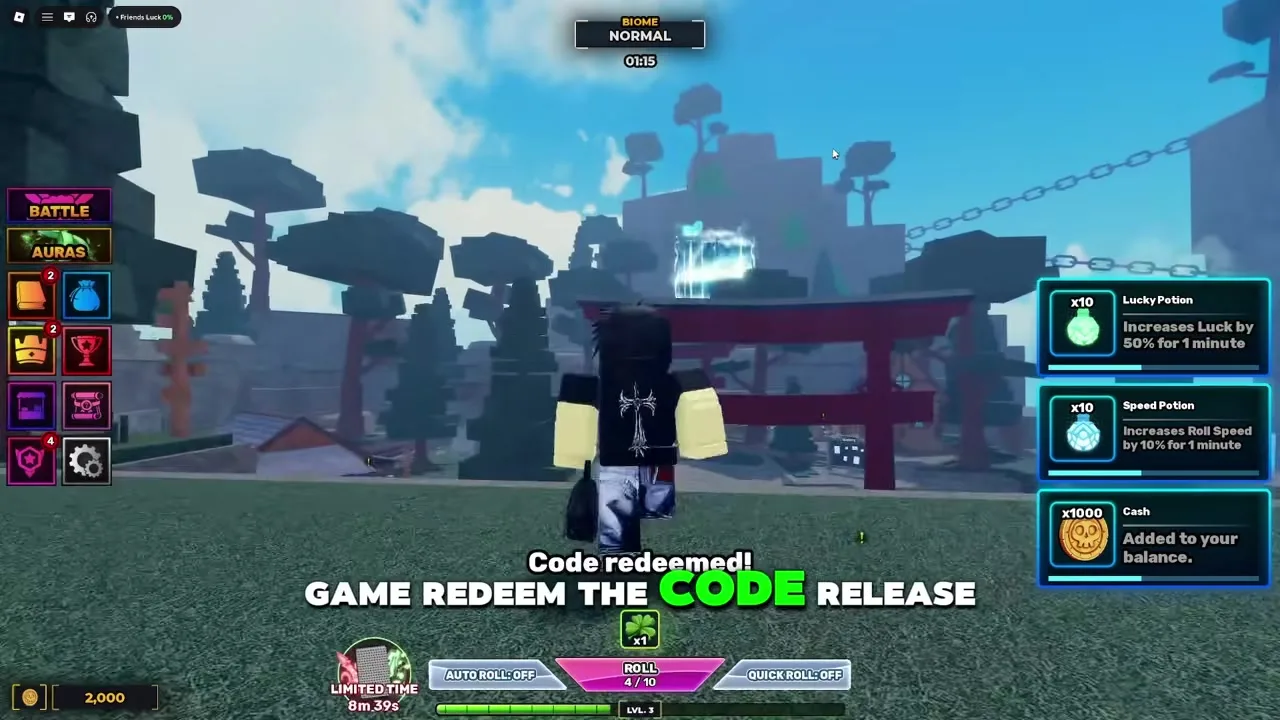
Watch the Settings-to-code-box flow, then use the troubleshooting tables below when a paste fails.
~8 min read
How to redeem Unscathed RNG codes: open the Roblox experience, use the Settings gear, scroll to the Codes field, paste one exact code, and press Submit. The hard part is not the route; it is avoiding small copy mistakes and knowing what to do when a launch-week code list changes.
This guide focuses on the redeem flow rather than inventing new code rewards. For the live table, start at Unscathed RNG codes, then return here when the Settings path, spacing, server age, or reward timing is the problem.
| Fact | Detail |
|---|---|
| Game | Unscathed RNG |
| Platform | Roblox |
| Roblox Place ID | 122951224417794 |
| Redeem menu | Settings gear -> Codes field |
| Best source for codes | Codes table plus official Discord updates |
| Official Discord | discord.gg/UnscathedRoblox |
| Last code data check | August 23, 2026 |
| Main caution | Preserve capitalization and spaces; try unknown codes last |
Use this route when you are in the Roblox game and ready to claim one code. Do not paste several codes into the field at once. Wait for the result message after each submit so you know which reward arrived and which code, if any, failed.
| Step | Action | Checkpoint |
|---|---|---|
| 1 | Open Unscathed RNG on Roblox and load into Place ID 122951224417794. | Roblox place |
| 2 | Select the Settings gear on the left side of the screen. | Settings menu |
| 3 | Scroll to the Codes field, paste the code exactly, then press Submit. | Code box |
| 4 | If a code fails, check capitalization, spaces, server age, and Discord announcements before retrying. | Troubleshooting |
One-at-a-time redeeming creates a clean audit trail. If WEEK1 works and CYBER fails, you know exactly what changed. If you paste a string of codes or rush the button, you only know that something went wrong. This matters because Unscathed RNG rewards can include potions, Cash, Shards, or rare items that should be routed differently after the claim.
The safest flow is simple: open codes in another tab, use the Code column copy button, then paste in-game. Manual typing is fine for short all-caps codes, but spaced codes such as Thank You are exactly where players accidentally remove the character that made the code valid.
After you know the route, check the pre-submit list below. It catches the issues that make a valid code look broken.
A code claim is a small action, but it can affect a larger plan. Unscathed RNG is built around rolling Auras, stacking luck, crafting potions and equipment, upgrading skill tree stats, fighting bosses, and PvP. If the reward is only Cash, you can spend it quickly. If it is a high-value potion or rare item, claim it cleanly and save the decision for the right window.
| Check | Good sign | Fix if wrong |
|---|---|---|
| Correct game | The Roblox page is Unscathed RNG with Place ID 122951224417794. | Leave clones, reposted experiences, or unrelated games. |
| Current list | The source date is August 23, 2026 or newer. | Use codes before trusting a copied post. |
| Exact text | Capital letters, numbers, and internal spaces match the table. | Copy again; do not trim spaces inside the code. |
| Server age | The server loaded after the code was announced. | Rejoin a fresh server after major updates. |
| Reward plan | You know whether the reward is Cash, potion, Shard, or rare item. | Pause before spending anything that affects luck. |
Roblox experiences can have servers running across an update boundary. When a newly announced code fails for everyone in your server but appears credible, rejoining is a cheap test. Do that before assuming the list is fake, especially around launch-week updates or biome events.
A speed potion and a luck potion are not the same decision. Speed helps when you are ready to roll continuously. Luck and Fate-style rewards are better when your biome, gems, traits, skill tree, and target Aura line up. Twist of Fate should be treated as high-value until the current tooltip and effect are captured in-game.
If the code still fails after those checks, use the failure table next instead of repeating the same paste.
A failed redeem message does not always mean the code never existed. It can mean the code expired, the text changed, the server is stale, the code was already claimed, or the source mixed in another Roblox game's code. Work through the table in order and you will usually know which category you are in.
| Symptom | Likely cause | Best next move |
|---|---|---|
| Nothing happens after Submit | Menu focus, lag, or missed button press. | Click outside the field, paste again, and submit once. |
| Invalid or similar error | Wrong spelling, missing space, expired code, or unrelated list. | Copy from the table and compare status. |
| Already redeemed | The code worked earlier on the same account. | Move on; codes are normally one claim per account. |
| New code fails in an old server | Server may predate the update. | Rejoin and test once more. |
| Reward is different than expected | Public reward text may be stale. | Trust the in-game message and note the difference for later update. |
Typing random variants of a code wastes time and makes it harder to remember what you actually tested. If RELEASE works, but Release, release, and RELEASE! fail, that does not create new information. It only confirms that exact text matters. Use the checked list, unknown entries last, and stop when the source is no longer credible.
Matched by build plan, shared topics, and guide progression — not random related links.
After a successful claim, slow down for ten seconds. Codes are valuable because they accelerate the existing game loop, not because they replace it. The public core loop is roll Auras, craft equipment and potions, upgrade skill tree stats, defeat world bosses, and PvP. A reward should strengthen one of those steps.
| Reward | Spend now if... | Save if... |
|---|---|---|
| Cash | It buys an upgrade or system unlock you already planned. | You do not know what the next bottleneck is. |
| Lucky Potion | A target Aura and matching setup are ready. | You are still sorting menus, inventory, or biome target. |
| Fate Potion | You have a meaningful roll window and enough time to use it. | You are in a normal low-value window. |
| Swift / Speed Potion | You can roll continuously for the full duration. | You are about to leave, fight, or compare builds. |
| Shard | A known upgrade, trait, or gem cost is blocking progress. | You are tempted to spend just because the currency is new. |
| Twist of Fate | The current tooltip confirms the effect and the timing is planned. | You only know it came from a code reward. |
A beginner-friendly route is: redeem codes, use safe Cash upgrades, read the beginner guide, then build a luck window through luck guide, biomes, and potions. That sequence makes the code reward part of progression instead of a disconnected freebie.
If a reward changed your potion count, Shards, or Cash, write down the before-and-after value if the UI makes it easy. This helps when a code list says one thing and the game grants another. It also protects you from spending a rare item and later forgetting whether the code ever gave it to you.
For future problems, the safest source path is short: official community first, checked table second, random reposts last.
Use the official Discord invite discord.gg/UnscathedRoblox for announcement context, then compare against the checked table on this site. If a code appears only in a random short post with no date, no reward, and no update context, do not treat it as working.
A useful report says "WEEK1 gave these items on August 23 in a fresh server" or "CYBER failed after rejoin with exact capitalization." A vague report says "codes broken." Specific reports let a guide page change status without guessing, which is especially important during the first weeks of a live Roblox experience.
Keep codes open while redeeming. It has the latest table, status labels, and reward notes, while this page explains the path and mistakes. Together they cover the complete code flow without turning every failed paste into a full troubleshooting session.
Open the Roblox game, select the Settings gear, scroll to the Codes field, paste one exact code, and press Submit.
It is inside Settings. If you do not see it immediately, scroll through the settings panel rather than looking for a separate shop page.
Use the copy button on the codes page first. Manual typing is riskier for capitalization and spaces.
The space is part of the code text in the current data. Copy it exactly and do not collapse it into ThankYou.
Usually no. If the game says it was already redeemed, move to the next code instead of retrying the same account.
This page shares the same data as the codes table: 6 public entries tracked, last checked August 23, 2026.
August 23, 2026
Matched by build plan, shared topics, and guide progression — not random related links.